









StoneShot Learning > Contacts Lists > ConsentTrack
ConsentTrack
Learn how ConsentTrack lets you measure email campaign performance while only identifying individual recipients who’ve consented to tracking.
What is ConsentTrack?
Email tracking pixels are increasingly treated the same way as cookies by regulators, meaning identifying who opened or clicked an email generally requires the recipient’s prior consent. ConsentTrack lets you keep your campaign-level metrics intact while only tracking named individuals where consent exists.
The Four Tracking Levels
ConsentTrack works by applying one of four tracking levels, set at the account level and per contact:
- Level 0 – No tracking. No pixel, no link redirection. Links go straight to their destination.
- Level 1 – Campaign Only (anonymous totals). Every recipient in a campaign gets the same identifier on their open and click links. You get a total count of opens/clicks for the campaign, but because the identifier isn’t unique per contact, there’s no way to attribute activity to any individual.
- Level 2 – Campaign-Unique (unique but unidentified). Each recipient gets their own one-way-hashed identifier. This gives you accurate unique open/click counts at the campaign level, without that activity ever being tied back to a named contact.
- Level 3 – Full tracking. Standard individual-level tracking, applied only where consent exists.
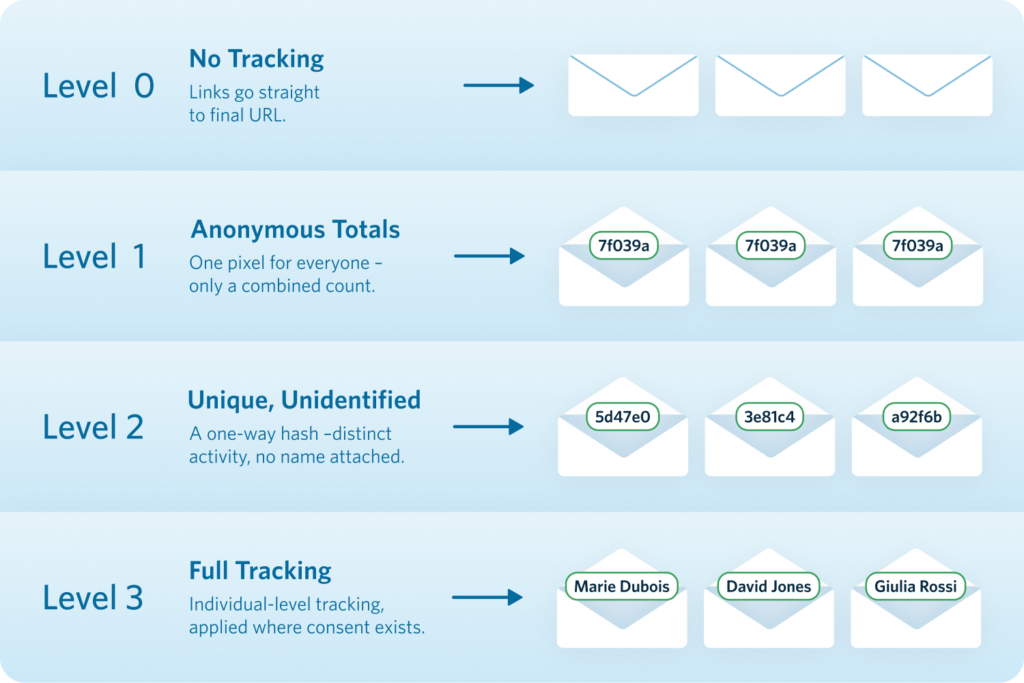
With both Level 1 and Level 2, individual contacts can’t be identified. Level 1 gives you a combined total of opens and clicks, while Level 2 gives you a unique count for each. That makes Level 2 the better choice when you want your campaign metrics to stay just as accurate, while still meeting regulatory requirements.
One Send, Mixed Levels
You don’t need to split your list or run separate sends. StoneShot can apply different tracking levels to different contacts within the same send: consented contacts get full (Level 3) tracking, while everyone else is measured anonymously. This means:
- No separate lists or workflow changes for your marketing team
- Emails render identically for every recipient regardless of level
- At Level 1, all recipients get identical links; at Levels 2–3, links differ per recipient, as with standard tracking
Tracking levels apply to both opens and clicks together.
Setting a Contact’s Tracking Level
Once ConsentTrack is enabled on your account, every contact record includes a Tracking Level dropdown alongside the existing opt-in/bounce flags, on the contact’s Detail tab. It has three options:

- Optin – the contact has consented to being tracked individually, and will receive full (Level 3) tracking.
- Optout – the contact has actively declined tracking.
- Unverified – no tracking consent has been captured yet.
Contacts who are Optout or Unverified are automatically measured at your account’s default anonymized level (Level 1 or Level 2), so they still contribute to campaign totals without being individually identified. You can update this flag manually on the contact record, the same way you would toggle the opt-in or bounce flag, or it can be set via CRM sync, list import, or a StoneShot preference form.
Reporting Impact
Campaign-level reporting (deliveries, opens, clicks, trends, benchmarking) stays complete across your whole audience, since anonymous recipients still count toward totals. Individual-level features (engagement scoring, sales alerts, journey triggers) apply only to consented contacts. BotShield continues to filter out fake engagement before it reaches your reporting, regardless of tracking level.
FAQ
Does anonymous tracking still give me useful reporting?
Yes, Level 2 gives you solid campaign-level metrics, it just stops you identifying specific contacts that opened or clicked. Your legal team should determine the appropriate configuration for your organization’s specific requirements.
Can I use different tracking levels for different regions in the same list?
Yes. A single global list can be handled with per-contact precision in one send — for example, anonymous tracking for one group and full tracking for another, all within the same campaign.
Does it change what the recipient sees in the email?
No. Emails render identically across all tracking levels. The only difference is in the underlying links and pixel behavior, not the visible content.
How do I turn ConsentTrack on for my account?
ConsentTrack isn’t enabled by default and requires a short setup process, since your team needs to decide on a default tracking level (Level 1 or Level 2) for contacts who haven’t opted in. Reach out to support@stoneshot.com to get started.
What's the difference between the Opt-in flag and the Tracking Level dropdown?
The Opt-in flag controls whether a contact receives emails at all. The Tracking Level dropdown (Optin/Optout/Unverified) is separate, and only controls whether that contact’s opens and clicks can be individually tracked once ConsentTrack is enabled. A contact can be opted in to receive emails but still be Optout or Unverified for tracking.